Release notes
Advanced Route Management
We've introduced a suite of powerful features that give you unprecedented control over route management, helping you adapt to real-world delivery challenges while maintaining efficiency.
STOPS
Automatic Route Preservation
Your optimized routes are now automatically saved based on your configured settings. No more lost optimization work or manual saving steps. When your optimization scheduler runs overnight or during planning sessions, every carefully calculated route is preserved and ready for dispatch.
Split Orders on Demand
Sometimes reality doesn't match the plan. Now you can stratigically remove individual orders from existing routes without disrupting the entire route structure. Whether it's a last-minute cancellation, a priority change, or a special handling requirement, you maintain complete flexibility.
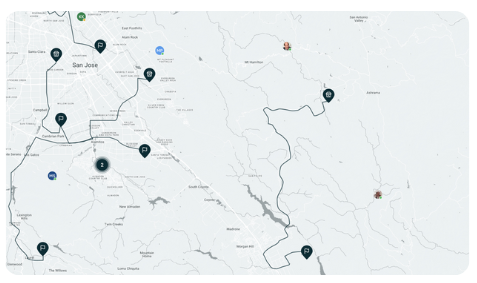
Visual Route Comparison
See the full picture with our enhanced map visualization. View and highlight multiple routes simultaneously to:
- Compare driver territories for balance
- Identify optimization opportunities
- Spot potential conflicts or overlaps
- Make informed decisions about route adjustments
Seamless Manual Adjustments
We've eliminated friction in the manual route adjustment process. Drag and drop stops to reorder them, and see changes reflected instantly on the map. The system handles these manual tweaks, ensuring you can dispatch modified routes without any technical hurdles.
Real-World Impact
Imagine this scenario: It's 7 AM, and your overnight optimization has created 50 routes for the day.
Then:
- A VIP customer calls needing priority delivery
- A driver calls in sick
- A merchant location has a delayed opening
Previously, these changes could unravel your entire dispatch plan.
Now:
- Split the VIP order from its current route
- Reassign it to your most reliable driver
- Redistribute the sick driver's stops across nearby routes
- Adjust timing for the delayed merchant
- Save all changes automatically
All accomplished in minutes, not hours.
The Bottom Line
These route management enhancements represent a fundamental shift in how you can respond to the dynamic nature of delivery operations. Instead of rigid routes that break under pressure, you now have fluid, adaptable plans that bend without breaking. This means better on-time performance, happier customers, and less stress for your team.
Getting Started
Want to strategize? Contact your CSM or the Nash Support team for implementation questions, or check out our help center for guides.
Under the Hood: Logistics Enhancements
- Automatic route saving - Routes created through the optimization scheduler can now be automatically saved based on your configured settings, eliminating manual steps and ensuring optimized routes are preserved.
- Split orders from existing routes - Dispatchers can now split individual orders from pre-planned routes, providing flexibility to handle last-minute changes or reassignments without disrupting entire routes.
- Improved dispatch strategy UI - The interface for reassigning deliveries at pickup has been redesigned for clarity, making it easier to understand and configure different dispatch strategies.
- Multi-route map visualization - View and highlight multiple routes simultaneously on the map, enabling better route comparison and overall dispatch planning.
- Manual route arrangement fixes - Resolved issues with manual route rearrangement and dispatching, ensuring smooth workflow when making manual adjustments to optimized routes.
- Bulk refund management via CSV - Process refunds in the provider portal in bulk by uploading CSV files with refund details, dramatically reducing the time needed to handle multiple refund requests. Export existing refund requests for analysis and import resolution updates.
- Enhanced provider portal refunds - Provider portal users can now properly resolve refund requests and manage refund workflows, with import/export capabilities for efficient processing.
- Contextual tab information - Portal tabs now display additional context to help users understand the content and purpose of each section at a glance.
- Smart organization switching - Links to activities now prompt organization changes similar to delivery and order links, ensuring users are always in the correct context.
- Delivery window template export - Export delivery window configurations as templates for backup, sharing between locations, or bulk updates.
- Zone management exports - Download zone configurations in a structured format for analysis, backup, or migration purposes.
- Provider delivery ID visibility - The provider portal now displays the provider's own delivery ID as a sortable column, making it easier for providers to track deliveries using their internal reference numbers.
- Location-based order restrictions - Configure specific locations to stop accepting new orders, useful for managing capacity or temporary closures.
- CSV bulk upload for shift templates - Fleet managers can now upload shift templates using CSV files, streamlining the process of managing driver schedules across multiple locations. This enhancement significantly reduces the time needed to set up recurring shift patterns.
- Download shift templates - Export your existing shift templates to CSV format for backup, analysis, or bulk editing purposes. This complements the upload feature for complete shift management workflow.
- Signature proof of delivery in driver app - Drivers can now collect customer signatures as proof of delivery directly within the mobile app, providing verifiable confirmation of successful deliveries.
- Rich text notifications - Format customer notifications using Nash Triggers, with bold, italics, and other styling options to create more engaging and readable messages.
- Zone API enhancements - The Get Zone API response has been updated with additional fields and improved data structure for better integration capabilities. (TEC-14928)
- Enhanced shift filtering - The shifts API now supports date range filters, allowing more precise queries when retrieving shift data for reporting and scheduling purposes.