Release notes
Resequence keeps every stop you planned
Highlight
Resequence keeps every stop you planned. A route built by hand carries decisions a dispatcher has already made: these stops go together, and that customer was promised today. Resequence is there to put those stops in a sensible order. But when one stop didn't fit the route's limits, a window it would miss, a day that ran long, a capability the truck doesn't have, the optimizer returned no plan, and the route stayed as it was. Now Resequence keeps every stop, puts them in order, and shows you which limits the result bends, so the call on what to do about them stays with you.
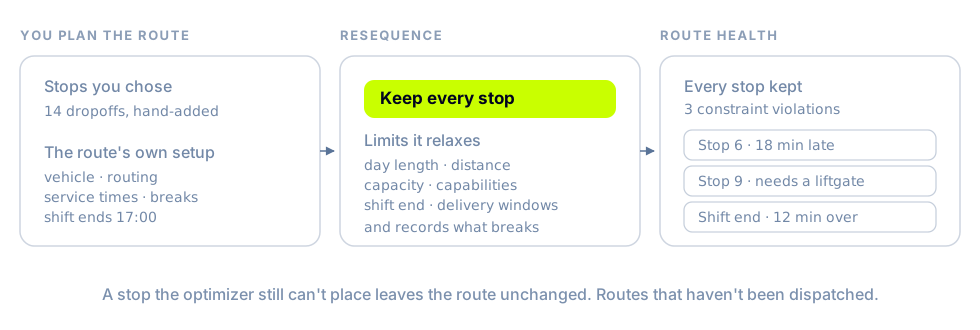
- It plans with the route's own setup. Resequence uses the route's vehicle, routing, service times, and driver breaks, so the order and times it returns are the ones that route will run.
- Nothing falls off. To place every stop, it relaxes the limits that would push one off: day length, distance, capacity, vehicle capabilities, the end of the shift, and dropoff windows. Pickup windows still hold. If a stop still can't be placed, the route isn't changed, and you're told so.
- It shows what it bent. The result reads Every stop kept · N constraint violations, the route card carries the count, and Route health in the route's details lists late stops, time past the shift end, over-capacity loads, and orders that need a capability the vehicle doesn't have, each linked to its stop. Acknowledge records that you've seen them. The route keeps its name, number, and vehicle.
- Start from an empty route. Create route on the Routes page makes a named route, with an optional start and end location, and opens it for orders. You can also move every stop off a route that hasn't been dispatched, the emptied route stays, so you can refill it, and routes that load at a depot can trade stops even when they leave from different depots.
Resequence and these edits work on routes that haven't been dispatched. (For organizations with Routes turned on.) See Plan routes on the Orders map.
New & improved
Portal
- Gather stops from several routes by ticking dropoffs in their route cards, then choose Move to route. Stops you picked that are already on the destination stay where they are. The route chooser lists the routes you've focused on the map first, marked Focused on map, and says beside the button why it can't confirm yet. (For organizations with Routes turned on.)
- The Orders map's Orders layer can show Needs Attention, Ready to Dispatch, Dispatched, or All orders, not only unassigned ones. Sort routes orders the route list by Route ID, so D2 comes before D10, or by Date created, and a route card's pickup collapses to one line with its order count.
- The Orders and Routes maps show their time zone on the toolbar. It defaults to your organization's, Use organization timezone at the top of the list switches back to it, and every time and date range on the map follows it.
- Choose the date range presets your organization sees. Date Range Presets, under Settings → Preferences, picks from Today, Yesterday, Tomorrow, This week, Last week, the new Next week, Last 7 days, Next 7 days, This month, Last month, and Next month, and every date range picker in the Portal offers that list, with Custom range always there. Until an admin changes it, pickers offer Today, Yesterday, Tomorrow, and This week. See Display preferences.
- Cmd+K (Ctrl+K on Windows) opens any page in your sidebar, Execute included, and your Account page.
Nash Agent
- A reply that reaches the limit of 50 tool calls in one turn ends with what Nash finished and what's left, plus a Continue button that picks up where it stopped. In Slack, reply "continue", or mention Nash with it in a channel. A step Nash hands to a specialist that hits its own limit no longer fails your reply or a scheduled run.
- Most capable and the OpenAI option under Nash Agent Settings → General → Model move to each provider's latest model. Organizations and agents already on either option move with them.
- A scheduled or triggered agent run on the OpenAI option that fails because OpenAI is unavailable retries once on a Claude model.
- The Nash MCP server's code mode runs up to 300 API calls in one block, up from 50, so a sweep across many orders finishes in one step. Each organization also gets its own share of the server's request rate, 30 requests per second, with bursts up to 75, so one organization's burst doesn't slow another's calls.
Fleet
Driver App changes reach phones on version 1.12 on their own and apply the next time the app starts. A phone still on 1.11 needs 1.12 from the App Store or Google Play first.
- The Driver App reads properly in Spanish, Portuguese, Simplified Chinese, Japanese, and Arabic. About 50 strings per language that still appeared in English are translated, including the screens a driver sees when their account can't load, and wrong words are corrected: in Chinese and Japanese, Return no longer reads as "go back" and Unassign no longer reads as "cancel", and in Arabic, Check In no longer reads as "sign in".
- The app tells drivers when the App Store or Google Play has a newer version. Update recommended shows the version and opens the store, and Not now hides it until the app next starts. It checks when the app opens or comes back to the foreground, at most every four hours, and stays quiet when the store can't be reached.
- Starting a route sends the driver's position, and the first stop's deliveries take it as their
courierLocationwhen they don't have one yet. When completing a stop moves the route on, the next stop's deliveries take that position the same way. - Route cards show when the route is planned to reach its first pickup, and sit under that day, rather than the first order's requested pickup time. A route without a plan still shows the order's time.
- Pickups and returns to the store use the Alternative Pickup Location you've set for your internal fleet on a pickup location, as the job view already did.
- Scanning a package marked failed or missing picks it up or delivers it, when the stop still allows that. Other failed or missing packages keep their status.
- Drivers can fail a dropoff with Out of Drive Time after heading to the stop, not only before.
Platform API
- Quotes under Dynamic Dispatch carry a
rank, with 1 for the provider Nash tries first, as quotes under the other strategies do. minimumVehicleSizeacceptscargo_bikeas well ascargobike.
Integrations
- Medzoomer deliveries itemize Medzoomer's final invoice. Wait-time, canceled-order, and return-to-pharmacy charges land in
waitFeeCents,cancellationFeeCents, andreturnFeeCents, andpriceCentsleaves out the courier tip, which you already see astipAmountCents. The invoice is final after the delivery completes; see When fees are final. - Autolane receives changes to a dispatched delivery's pickup and dropoff instructions.
- Correct a Team Global Express delivery's structured address,
pickupAddressComponentsordropoffAddressComponentsonPATCH /v1/jobs/{id}, until the delivery is manifested, so a suburb or postcode Team Global Express rejected can be fixed in place. Other providers still refuse structured address changes after dispatch. - AlShrouq receives your order's
externalIdas its order reference, so AlShrouq's team can match a delivery to your order number; an order without one sends the Nash delivery ID. AlShrouq accepts each reference once, so an order canceled with AlShrouq can't be sent to AlShrouq again. - Uber can receive each item's price on standard deliveries, as it already does for pick-and-pack orders. (Opt-in, per provider configuration.)
Fixes
Portal
- The severity pills on Execute count the routes the table shows for your dates, filters, and search. (For organizations with Execute turned on.)
- Route search matches what route cards show, and a short term like
D7no longer brings back routes whose generated IDs happen to contain it. Part of an ID, with its prefix, still finds the route. - Lasso and Polygon select only the orders drawn on the map.
- Routes near each other get clearly different colors, and in dark mode a selected order's path to its dropoff is visible.
- The optimization review shows each order's customer promise in the route's time zone.
- Going back from a delivery page returns to where you came from, such as a route, rather than Home.
- Duplicating a delivery carries its Reference ID into the new delivery form.
- Searching Users, Providers, and Drivers ignores spaces around the name you type, and Driver Pay shows drivers who have only a first or last name on file.
- Activating or deactivating a contract from the Contracts list keeps its drivers.
- When a contract or driver group can't be saved because a store location, depot, coverage area, or driver isn't available to your organization, the error says which kind it was.
- Refund requests from organizations in Nash's Australian region update with Nash support's decision, including the status and the refunded amounts.
Platform API
- Paging through
GET /v1/ordersreturns each order once, even when many orders share the value you sort by. Orders that tie are ordered by order ID in the same direction, and the Portal's order lists page the same way. - A job created from a route carries the tags every order on the route shares, all of them for a single-order route, so dispatch rules that match on tags apply to route work. The orders keep their own tags.
- After
POST /v1/jobs/{id}/rebook, the job keeps the provider, quote, and delivery the rebook selected. GET /v1/webhooks/messages/{msg_id}/attemptsreturns a404MISSING_RESOURCE, with the ID indetails.msg_id, when the message doesn't exist. Replaying an unknown message returns the same404and resends nothing.
Nash Agent
- Text before and after a lookup no longer runs together. A heading that follows a tool call starts on its own line, and new thoughts start new paragraphs, in the Portal, in Slack, and in custom-agent reports.
- A chat where Nash runs code keeps working. A message you send while a code step is running is picked up once the step finishes, a chat where Nash saved a file from Python keeps taking messages, and files you uploaded earlier stay open to Nash after you approve an action or answer its setup questions.
- When a chat or run grows past the AI model's context limit, Nash says so and suggests starting a new chat or asking for less data at once, rather than offering a retry that would fail the same way. Long analytics sessions reach that limit later, because each query result is sent to the model once.
- Custom agent results with a structured output format read cleanly: long reports render as formatted text, wide tables scroll sideways, and a value in an unexpected shape shows as readable data. Status badges are neutral, since a yes or no doesn't mean pass or fail.
- On the Nash MCP server, bulk reads wait and retry when the Nash API rate-limits them, so a large sweep comes back complete, and the photo-verification tools report
photo_found: falsefor a job with no photo yet. Code-mode calls to operations with an ID in the path, webhook message attempts, delivery feedback, removing an order from dispatch, assigning a route, finding a store location by external ID, send the ID and succeed.
Fleet
- Android drivers can call from the Driver App. Tapping a stop's phone number or Call Support opens the dialer with the number filled in.
- The Driver App holds up over a long shift. Going back returns to the screen the driver came from instead of opening a fresh copy, and on Android a map loads only while it's on screen, with the driver's position as a blue dot, an arrow while moving, and a My location button to re-center.
- A route's Total Weight in the Driver App shows its decimals, and a route under 1 kg shows its weight.
- On a started route, a return stop or the end-of-route stop opened ahead of its turn shows its actions.
- Scanning a package label that carries more than one barcode records one scan for the package.
- The ID check's signature step shows the minimum age the customer is confirming.
- A shift template creates each shift once, including a shift that has already started when the template runs.
- Create Fleet under Fleet › Driver Groups works when another organization already has a fleet with the same name. (For organizations with Fleet turned on.)
- A provider organization can save a contract whose eligibility lists store locations of a customer organization it supports.
Integrations
- A canceled Roadie delivery stays canceled when Roadie sends a later driver update, and canceling a delivery Roadie has already canceled succeeds. A shipment Roadie lets expire without a driver closes as
CANCELED_BY_PROVIDERwith the failure reasonexpired. - A Toast update that only changes a scheduled order's prep time leaves its delivery in place. When a Toast change does move the delivery time, Nash checks the new order before canceling the old one.
- Addison Lee deliveries show a dropoff ETA once the driver has the package, the pickup ETA clears, and Addison Lee's tracking updates move the delivery's status along.