Release notes
Judgment calls, as a branch
Highlight
Judgment calls, as a branch. A workflow could compare a field, and it could hand a whole step to an agent. The decisions in between, does this delivery note describe a safety problem, which of four teams should own this failure, how complete is this address, were too loose for a filter and too small for an investigation, so they stayed with a person reading a queue. An AI Decision node puts one bounded question to a model and sends the run down a branch per outcome.
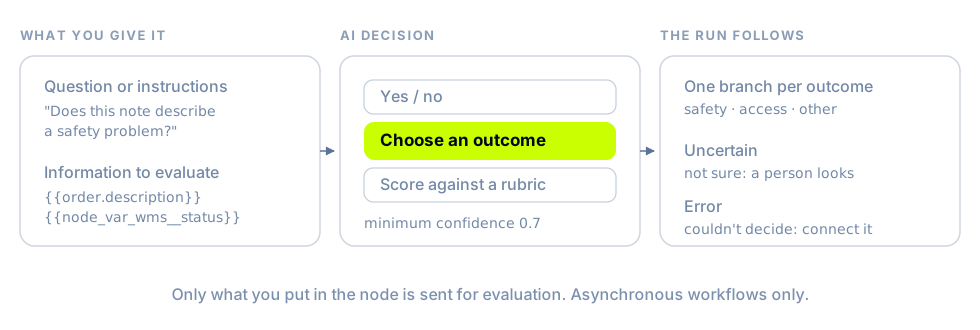
- Three shapes of answer. Yes / no, with the thresholds yours to set. Choose an outcome, from 2 to 32 outcomes you name and describe. Score against a rubric of up to 20 levels, split at a threshold into at-or-above and below. Each outcome is its own branch, so every path a run can take is drawn in the graph rather than implied by a prompt.
- It says when it isn't sure. Every decision also has an Uncertain branch, for an answer under your minimum confidence or between the yes and no thresholds, and an Error branch for a decision that couldn't be made. Uncertain is the branch a person looks at; connect Error, because a failed evaluation with nothing on that branch fails the run.
- It reads only what you hand it. You write the question and choose the information to evaluate, with variables from the trigger, the entity, and upstream steps. Filters now publish their results, so an earlier condition can be part of the evidence. Nothing else is sent. It runs on asynchronous workflows only, so it can't hold up an order that's being created, and a dry-run test follows Uncertain without calling the model.
In the API it's the ai_decision action, with decision edges that carry a branchKey. See Branch with an AI Decision.
New & improved
Orchestration
- Reschedule an order from a workflow. Reschedule order delays an order that hasn't been dispatched by a duration you set, 12-, 24-, and 48-hour presets, or anything from a minute to 365 days, or moves it to a calendar date at the same local time. Every pickup and dropoff window moves by the same amount, so their lengths and the gap between them hold. An order on a route, or with a booked delivery window, is refused with the reason. See Reschedule an order.
- Order-creation workflows can write more of the order. Update order instructions is now Update order text and covers the Order description as well as the pickup and dropoff instructions, and a new Update order metadata action adds, updates, or removes one metadata key and leaves the rest of the order's metadata alone. (For organizations with order-creation workflows turned on.) See Change one metadata key.
- A workflow on Task Attempts Exhausted can flag the failed task itself when dispatch never produced a delivery. The action is now Flag task or delivery, and it flags the final attempt rather than an earlier one.
- The workflow builder shows more of what a workflow is doing. An Editor / Runs toggle carries the latest run's status, a strip above the graph counts Runs today, Success rate, Errored, and Avg run time, and the workflows list has a Draft tab. A Custom Event Listener trigger takes an Event context, order, delivery, task, or job, that decides which conditions and actions follow it.
- Writing a workflow takes fewer lookups: typing
#in an action's text field opens a searchable picker grouped by entity, with upstream steps in a group of their own, and conditions on money fields such as package value and tip take dollars rather than cents.
Portal
- Select work on the Orders map. Click a pin to select every order at it, Shift+click to look without selecting, or Select all to take everything behind the current filters. Tools › Select area adds a Lasso and a Polygon for drawing around the orders you want, and the bulk action bar acts on exactly what the map shows selected.
- Put a whole selection on a route, or move stops between routes, without leaving the map. Add to route assigns every selected unassigned order in one step. Select route stops, by click or by area, and Move to route takes them to another route, refusing a move that would empty the route they came from. (For organizations with Routes turned on.) See Plan routes on the Orders map.
- Route cards on the map carry Edit and Archive alongside Dispatch and Resequence, and a route's provider and driver can be set from the card before dispatch, with a column each in the Routes table. Shift+click cards or route lines to hold several routes in focus, and hover a line for its driver, vehicle, planned time, distance, and stop count. Route colors come from a palette of 48 assigned across what's on screen, so two routes in view no longer share one.
- Every Portal map has a Layers control with a Satellite view, imagery with street names. Each screen's own overlays, routes, unassigned orders, customers, order labels, live traffic, sit in the same popover.
- Display fields chooses which order details, metadata, and tags appear on stop cards, with up to two printed on the map itself, set by an owner or admin for the whole organization. The labels show on route stops whether or not a route is focused.
- Keep internal notes on an order. Add them from the Orders drawer or the Notes tab of the Edit Order drawer, up to 2,000 characters each. They stay with the order through dispatch and show on the delivery with an Order note badge. They're internal to your organization: they aren't sent to providers or recipients, and the API doesn't return them.
- Archiving an order asks why. Pick a reason, or choose Other and type your own, and the Archived tab shows it in an Archive Reason column. Archiving several orders at once from the action bar doesn't ask.
- A package value over 1,000 asks you to confirm before a job or an order is created, and one over 100,000 is refused in the create and edit forms and in CSV uploads, so an order number typed into the value field is caught there rather than on an invoice.
- Organization Management appears in the Add role and Edit role drawers, so a custom role can carry it. A new custom role starts with its read side ticked, because signing in to the Portal needs it. See Roles and access.
- Orders and Routes open on Today, as Execute does, rather than on this month. A link or a saved view with its own dates still wins.
- The Edit Order drawer keeps the package identifier under the order ID in its header, so it stays in view on every tab.
- Fleet › Drivers has a map view: every driver in the current search and filters at their last reported location, colored by status and refreshed every 30 seconds. The search there also matches a driver's external ID, in full or in part. (For organizations with Fleet turned on.)
Nash Agent
- A custom agent's page has a Reports tab that opens on the newest file its recent runs produced. Step between runs with the arrows, pick among a run's reports, and open Artifacts to search, sort, and filter the files from all of those runs in a panel beside the page. See Review reports and files.
- TSV files and XLSX workbooks preview as tables, as CSV already did, with a Sheet picker for a workbook that has more than one. A preview shows up to 500 rows and says when it has cut a file short.
- A Daily Brief finding can be followed through. Each one shows its Latest observation and the result of a read-only check Nash runs on its own, and Refresh evidence runs another. I'll investigate puts your name on it, with a next action, a due date, and an outcome, and recording an outcome doesn't close a finding the agents are still seeing. Investigations keeps claimed work reachable under My work, Unclaimed, and Team work after the insight has left the brief. See Follow an insight through.
- In a live chat, a follow-up correction edits the script Nash already wrote instead of starting over, so a revised file comes back sooner.
Platform API
- Collect cash on delivery. Set
dueAmountCentson an order to the amount the driver must collect from the recipient: equal tovalueCentsfor full cash on delivery, less for a part-paid order,0or absent for a prepaid one. It can't exceedvalueCents. Dash honors it today; other providers treat the order as prepaid. The amount comes back on order responses and in the package block of job responses and webhooks. See Collecting cash on delivery.
Fleet
- Stop details in the Driver App show the business name and the point of contact on separate rows, so a driver sees both the destination and the person to meet. A stop with only one of them still shows one row.
- A stop action from the Driver App, arriving, completing, carries the driver's position at that moment, and the delivery's
courierLocationtakes it, so the last known location is where the driver actually did the work. If the phone has no fix, the action goes through without one.
Integrations
- DoorDash reports the Dasher's ID, and a delivery's Driver Details shows it as Driver ID.
Fixes
Orchestration
- A Send HTTP request body that references a list-like field such as
{{order.tags}}goes out, with the values as a sorted JSON array. It used to fail while the request was being built, before anything was sent. - Conditions on an order's pickup and dropoff window times read the window Nash calculated for the order, so a relative-time condition such as "pickup starts within the next two hours" evaluates against the real window.
- A workflow on the Task Reassignment trigger can branch on order fields. The builder takes each trigger's available fields from the server rather than a list of its own, which had left order fields out.
Platform API
- Removing an order from dispatch keeps its external ID and reference ID, so the order can still be found, and dispatched again, by external ID.
- After a large job is split, the original job reports its own items rather than the full list from before the split.
- An order created from address components returns an
addresson its pickup and dropoff, not an empty field. - Updating an order without touching an address leaves that address as it was. A saved pickup pin no longer shifts when only the instructions change, so arrival at pickup keeps registering.
Portal
- Large Orders maps stay responsive while you pan, zoom, scroll the list, and focus routes. Markers and pins are reused rather than rebuilt, route lines update without a full redraw, and list rows no longer react to the camera.
- Selected orders draw on the map again: each shows its pickup pin and the road path to its dropoff, and opening the Unassigned tab turns the order layer on.
- Driver call activity appears in order and route timelines, including calls recorded without a provider task.
- Webhook entries in delivery and route timelines read Webhook sent and name the trigger that fired, instead of listing the webhook's configuration as a recipient.
- Quote results label a provider Nash couldn't quote as Unavailable rather than Failed, with the reason in the tooltip, so a provider your dispatch strategy excluded no longer reads as an outage.
- Review & Dispatch weight totals follow your unit preference, as the route table does.
- Sorting Pickup Locations by name sorts across every page, and the sort controls that did nothing are gone.
- The pickup time on a route-based delivery shows the route plan's first pickup stop, falling back to the requested window when the route has no plan.
- A notification contact group takes the same channel type more than once, so a group can hold several email destinations.
Nash Agent
- A run that stops early, or can't save every file it generated, is reported as incomplete rather than successful, and the output and files it did produce are kept.
- A long run that pauses partway continues instead of stopping before its files are written.
- Spreadsheet, CSV, and JSON files you upload to a chat reach the agent as files it can open rather than as pasted text, and a session holds up to 15.
- Switching organizations from a Nash Agent page opens the new organization's agent area instead of asking you to switch back.
Fleet
- The Driver App no longer closes on Android while the skip-stop drawer is opening. The fix is in version 1.12 of the app, which is a new build rather than an in-place update.
- Starting a route moves to the first stop that still needs a visit, so a pickup whose orders were all canceled doesn't leave the route stuck on a stop nobody can complete.
- Sending an arrival for a stop the driver has already arrived at succeeds and changes nothing, rather than failing. Completing a stop that's already complete behaves the same way.
Integrations
- Tookan driver-location pushes update the courier's live position, name, phone, and vehicle on the delivery. They carry no job status, and were being set aside for that reason.
- Gophr receives a package's real weight and dimensions when the package holds several items, instead of having them multiplied by the item count.
- Editing a Team Global Express delivery before it's manifested succeeds, and editing one after returns a 422 that says to cancel and re-create it, rather than a server error.
- A delivery that has been picked up no longer moves back to an assigned-driver status when a provider re-reports an earlier state. Cancellations and completions still apply.