Release notes
Validate orders with your own rules
Highlight
Validate orders with your own rules. Nash checks every order it takes in, an address that won't geocode, a pickup time already in the past, and parks the ones that fail as needing attention, with the reasons on the order. But the rules that catch the most expensive mistakes are usually yours, not ours. An unattended delivery with no dropoff instructions is a delivery that fails at the door. A reference ID in the wrong shape is a delivery your warehouse can't match. Until now those checks lived in your ordering system, or in a person reading the queue after the order was already in.
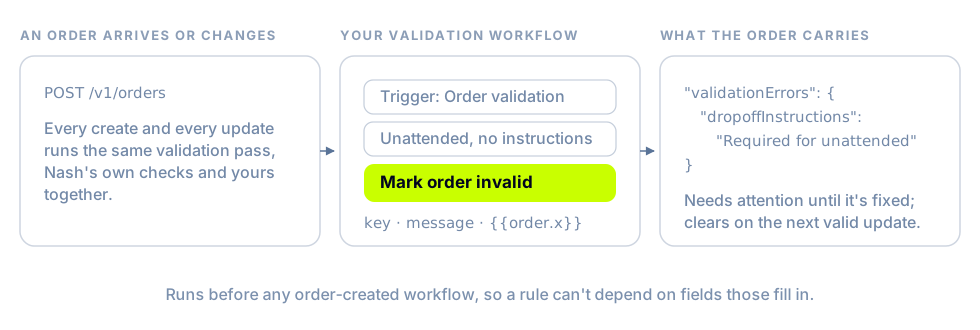
A workflow on the new Order validation trigger adds your rules to the same pass.
- It runs inside validation, not after it. The trigger fires synchronously on creation, on every update, and on CSV upload, before any order-created workflow runs, so a rule can't depend on a field one of those fills in, and an order never sits in a valid state it shouldn't be in.
- Mark order invalid says what's wrong and where. The action takes a field and a message. Name one of the order's own fields, such as
dropoffInstructions, and the Portal's order form highlights it; the error lands invalidationErrorsbeside Nash's own, the order's status becomesneeds_attention, and the key clears on the next update that satisfies the rule. Messages can carry the order's own values. - Formats are a filter. Two operators arrive with it, Matches pattern and Does not match pattern, which test a field against a regular expression. Reference IDs, barcodes, and anything else with a shape can be checked without a line of code on your side. A pattern is compiled when you save, so a broken one is refused there rather than at run time.
- It fails closed. A rule that can't run, or a condition that can't be evaluated, marks the order with a reserved
workflowValidationerror naming the workflow rather than letting the order through. Every run, including one that marked nothing, shows in the workflow's Runs tab.
See Validate orders with your own rules.
New & improved
Orchestration
- Branch on whether something has happened to an order, not only on what its fields hold. Four filter-only fields,
order.custom_event,job.custom_event,task.custom_event, anddelivery.custom_event, take Has occurred or Has not occurred and the key of a custom event from your catalog, so a pickup-window workflow can continue only when the store hasn't sentstore_ready. The check is taken when the trigger fires and stored with the run, so a late worker or a retry can't flip the branch. See Branching on whether an event has happened. - One status trigger, several statuses. A Delivery Status Transition trigger names any number of statuses in
deliveryStatusesand fires on each on its own, in both Notifications and the workflow builder. A trigger you already have with a single status is untouched. See Notifications. - Order fields are available on delivery, job, and delivery-attempt triggers, so a delivery-status workflow can branch on the order's value or tags and put
{{order.*}}in what it sends. A condition on an order field in one of those contexts used to resolve to nothing; if you built one that never took the branch you expected, it will now, so it's worth a look at what it does. See Fields worth branching on. - Filter on who won and what it cost.
delivery.provider_nameanddelivery.provider_delivery_idname the provider fulfilling a delivery and the ID it gave it;task.provider_namedoes the same for the attempt;delivery.delivery_fee_centsis the base fee the provider charged, before tolls and wait time. - A Send email action takes several addresses, and each is checked against the deny list and delivered on its own, so one refused address doesn't take the rest with it. Fill addresses from destination in the Portal copies a notification destination's current addresses into the field, once. See Writing text with variables.
- The editor refuses a variable that can't resolve at the node you're on when you save, and suggests the nearest match, so a typo surfaces before the workflow runs rather than as a blank in a message. The field picker offers only fields whose entity can exist for the trigger you've chosen, and marks the ones that may be empty for it.
Portal
- A skipped stop shows as skipped. When a driver skips a stop and comes back to it, Skipped and Resumed events appear on the route's detail panel, the order drawer, and the delivery timeline, with the driver's reason when they gave one. Before, the Portal showed none of it, and a skip note could land in the stop's failure slot on a stop that hadn't failed.
- The route timeline is drawn as drive, service, waiting, and break segments in proportion to the time each takes, with the shift's end marked and any overrun called out, on both the Optimize review and Execute. Select a dropoff on it to open the route panel at that stop. See Watching routes on the Execute page.
- Open a delivery's request logs from its page. Request Logs sits beside Events on the job page and shows every request scoped to that delivery's job and order IDs, with an API / Provider toggle in place of a checkbox hidden behind a gear, and a Source row on each request so a shared link identifies itself. Provider traffic appears when provider logs are enabled for your organization.
- Hover the provider in a delivery's details to see the contract it won under, for external providers as well as your own fleet.
- Delete a proof-of-delivery photo with a permission of its own.
delete.proof-of-deliveryis held by Owner and Admin and separate from editing the delivery; the confirmation says what will happen, the photo leaves Nash immediately, and storage cleanup runs in the background. See Roles and access. - The Driver Groups page gains a Provider column and filter for organizations running more than one internal provider, and creating a second driver group asks for its provider rather than accepting none.
Tracking page
- Give customers somewhere to go. Set a Support URL under Customization › Tracking and the tracking page shows a Need Help? button that opens it with the order's ID appended, so your support desk knows which delivery the customer is looking at. The link must be
https. See A support link on the page. - The tracking preview is organized by journey: Before delivery, During delivery, and After delivery, each with its own settings, so you can check what a customer sees at each phase. The pre-dispatch switch now reads Customers can open the link before a driver is assigned.
- Choose the scale customers rate a delivery on, thumbs up or down, one to five stars, or a 0–10 NPS question, under the After delivery tab, and the tracking page links to the feedback form once the delivery is done. Every scale reaches the feedback API as a 0–5 score, so NPS answers can arrive in half steps. (For organizations with delivery feedback turned on.) See Add Delivery Feedback.
Nash Agent
- Start the day from the Daily Brief. It now leads with one Agent insights list, the patterns Nash curated from what your agents recorded, up to twenty at a time, unread first, with the confirmations waiting on you kept apart under Awaiting your decision. Each insight carries Verify in Nash links to the agent session and message behind every cited observation, so you can check the source before you act, and Ask Nash opens a chat with the insight attached as evidence. See Daily Brief.
- The brief is yours. An insight you've read comes back as Updated when new evidence lands, Dismiss clears it from your own brief and nobody else's, and the sidebar entry counts what you haven't read. A finding that is really about Nash itself, or about an agent's configuration, is routed to Nash's team rather than to your brief.
- Each custom agent's page shows its Fresh signals: what it recorded in the last 24 hours and the organization-wide insights it contributed to.
- An agent can act on the organizations beneath yours. (Opt-in.) An owner or admin of a parent organization turns on Let agents act on child organizations under Nash Agent's General settings, and each agent opts in with its own Acts on child organizations switch; every call the agent makes then names the organization it's for, and it switches to the child that owns each job. Turning the organization switch off revokes the shared credential immediately. See Scope.
- See which routes an agent is watching from Execute. An Agent watch column names the agent, whether its watch is live or ended, when it last looked, and when it checks next, and two Agent coverage filters narrow the queue to routes an agent has assessed, or hasn't. See Seeing coverage in Execute.
- Files an agent produces render as thumbnails in the chat, an image preview, the first page of a PDF, the head of a CSV, grouped into a strip when a message carries several.
- Chatting with a custom agent now uses the same analytics toolkits its scheduled runs do, so a question that comes back as hundreds of rows arrives as a table or file rather than being retyped into the reply.
- A run has an hour to finish, up from thirty minutes, so an agent working through a few hundred records isn't stopped mid-write.
- The Nash MCP server's most common reads are first-class tools instead of code an agent has to write each time.
find_orderresolves whatever identifier you have in one call;list_orders,list_jobs, and the bulk gets take typed filters and afieldslist, and workflows, dispatch strategies, contracts, and providers are readable too. See What the server exposes.
Fleet
- The driver app is available in Dutch and German, from the device language or the in-app picker.
- Loading a pickup no longer waits on the network. Every tap in the package list queues and renders at once, picks sync in the background in batches, and everything else is sent when the driver taps Complete Loading, with a plain message if the sync fails, and the driver's work kept.
- One push per route change. When a dispatched route is edited or split, the driver gets a single Route updated or Route split notification, instead of one Delivery canceled push for every stop that moved.
- An action a driver took offline carries the time they took it, so stop and item timestamps reflect when it happened rather than when the phone reconnected.
- Provider organizations choose who receives their payment statements, under Settings › Provider Profile › Payment statement recipients, with the Stripe Connect account email shown alongside for reference.
Platform API
- A dispatch-and-manifest batch that a carrier rejects as a whole is resubmitted one shipment at a time, so the single shipment it won't take fails alone. Each failure is its own entry in
errors[]with the carrier's own message,manifests[].delivery_idslists only what was accepted, and a failed order stays dispatched so a later call retries it. The single-purpose manifest call keeps its all-or-nothing behavior. See Dispatch and Manifest Orders. - A rejected proof-of-delivery artifact on a Fleet API update, a
file://reference, or one past the 50-per-delivery cap, fails the update rather than being dropped quietly. See Lifecycle & validation.
Integrations
- Gophr receives one parcel per item, each with its own description, weight, dimensions, and quantity, when every item in a package carries dimensions.
- Tookan job-status webhooks are processed as they arrive, so status, driver location, courier details, the tracking link, and proof-of-delivery photos land when Tookan sends them rather than on the next poll.
Fixes
Orchestration
- A Send HTTP request whose template has a variable with no value still goes out. The variable hydrates to empty text, each miss is recorded on the run's step, and when a call does fail the step says at which stage, building the request, connecting, authenticating, transport, the HTTP status, or reading the response. See Call your own system.
- Messages a workflow sends appear on the delivery's Notifications timeline, typed Workflow with the workflow's name, so "did we tell them?" has an answer for workflow-sent SMS, email, Slack, and Teams as it already did for triggers.
- A workflow built in an older editor validates and saves. Its filter's single unlabeled branch is read as the Yes branch and stored that way, the branch the runtime was already taking.
- Editing a notification destination while a search filter is active adds and removes the row you meant, and removing a draft row no longer wipes a neighbor's unsaved edits.
Dispatch
- Archiving an order that sits on a route takes it off the route first. If the route refuses, the order stays valid rather than being archived while the route's stops still name it.
- Orders the optimizer can't fit on a shift-based run dispatch through the strategy's unassigned-orders fallback instead of being left behind; the activity stays in progress until that dispatch completes.
- The optimization overview map opens for a run that includes break stops.
- A strategy link with an unknown ID reports not found instead of opening a different strategy's configuration under that URL.
- Opening a past optimization run shows its setup and selected strategy rather than a blank Setup step, and a strategy that names contracts belonging to providers not currently enabled keeps them, labeled as outside the eligible roster, instead of showing zero providers and dropping them on the next edit. The Strategy step links to Manage strategies.
- A completed activity replay closes with a single Close action.
Platform
- Location history keeps every ping on a delivery that runs past a day. A throttle was reading only the sub-day part of the interval, so a long-running delivery dropped a courier location every subsequent day.
- A complete-stop the driver app sends twice is accepted as already done, so an offline queue draining after the route finished no longer errors.
- Filing a refund is idempotent per task: a retry of
POST /v1/request-refundreturns the originalrefundRequestIdinstead of opening a second request. See Refund requests. - Photo proof-of-delivery checks count a shipping label affixed to a parcel as evidence of the delivered item, and one valid photo in a multi-photo set is no longer outvoted by a context photo. (For organizations with photo verification turned on.)
Portal
- A driver whose vehicle color was saved with a trailing space can be re-enabled; the invisible character was failing validation on the Vehicle tab with no explanation.
- The order CSV upload accepts the plural
pickupStoreLocationIdscolumn, which the API already did, instead of reporting a missing pickup location on every row that used it. - Merchant attribution on NashLink orders shows across the Deliveries, Orders, Shipping, and Execute views and the order drawer's Merchant tab.
- The tracking page reads Delivery attempt failed for a failed delivery instead of Delivery canceled, and names in-transit, ready-for-pickup, partially delivered, being-returned, and expired states instead of falling back to Tracking your order.
Fleet
- With item marking skipped, the package list opens read-only, so a driver can still read what's on the shelf; before, it wouldn't open at all.
- A loading change the server refused no longer blocks Complete Loading for the rest of the route. The list refreshes with a message saying what didn't save, and the driver taps again.
- Opening a pickup's package list no longer holds up later dropoff actions on the route, and Mark as Picked Up commits queued work the same way Complete Loading does.
Integrations
- Team Global Express receives delivery instructions up to 80 characters intact, and parentheses in them no longer reject the manifest.
- CBD carton scans register as in transit, so a delivery shows the on-road scan on tracking pages and in status webhooks instead of jumping from manifested to delivered.
- Uber proof-of-delivery photos are captured from Uber's delivery API as well as from its webhooks.
- Roadie delivery updates carry a five-digit ZIP, so an address stored with a ZIP+4 no longer has its update refused.
Nash Agent
- A chat that exceeds the model's PDF page limit says so, with the limit and what to do about it, instead of failing with a provider error.
- An agent with too many strict tools enabled gets a clear error naming the cause instead of a silent retry loop.
- Entity Monitor watches complete every scheduled check.
- A code-mode step that pages through a long list finishes instead of timing out at 30 seconds and losing what it had computed.
- A long chat turn is no longer ended early as abandoned while it's still working.
- "Yesterday" and "last 7 days" resolve against one clock for the whole run, including across a daylight-saving change.
- A refund the agent files through a delivery incident follows your refund confirmation policy, and confirmations left pending by a run that timed out are retired rather than left waiting for an answer.
- A Nash MCP server instance that couldn't load the API catalog at startup is taken out of rotation and retries, instead of answering every call with an unknown-tool error.