Release notes
Shopify Settings Overhaul
We've enhanced the Shopify settings interface based on merchant feedback, introducing powerful new controls that give you more precise management over your delivery operations. These updates help merchants reduce checkout abandonment with accurate delivery options, improve efficiency with better capacity management, and scale operations with confidence.

Fulfillment Type Management
Toggle specific delivery options on or off directly from your dashboard. Control whether customers see same-day, next-day, scheduled delivery, or pickup options. Additional settings for each fulfillment type coming soon.
Max Delivery Days Setting
Control how far in advance customers can book deliveries (up to 30 days). This helps manage operational capacity and prevents bookings too far into the future.
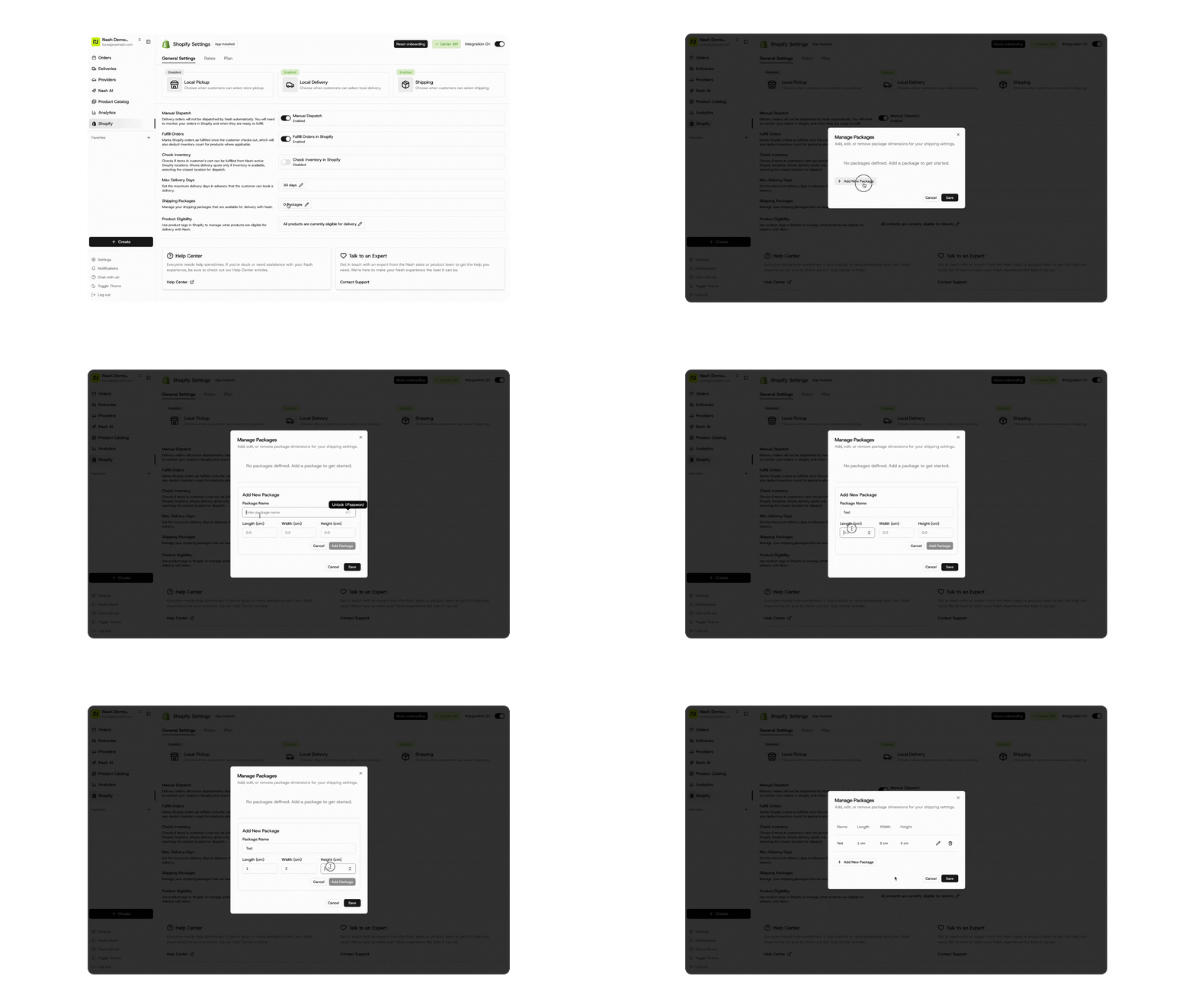
Custom Default Package Dimensions
Define your standard package sizes (length, height, width) for more accurate shipping calculations. This leads to better rate quotes, improved carrier matching, and reduced shipping cost surprises.
Improved Interface
- Dedicated Plan Tab: Review your subscription without cluttering main settings
- Smart Guidance: Clear banners explain feature limitations (like rate cards for non-carrier API merchants)
- Better Visual Design: Enhanced product eligibility badges and cleaner layout
Under the Hood: Logistics Enhancements
⚙️ Dispatch
- Split orders from routes: Functionality allows dispatchers to split orders from existing routes for better flexibility in route management and real-time adjustments.
- Optimized route visibility: Once orders are optimized into routes, they no longer appear in the "Ready to Dispatch" view, preventing confusion and duplicate assignments.
- Provider notifications: Providers can receive automated notifications about new delivery opportunities and updates, improving communication and response times.
- Enhanced provider notification controls: Updated provider notification interface with streamlined options and clearer guidance for destination management.
- Geographic contract eligibility: Provider contracts, from the merchant portal, support state-level eligibility configuration, including Puerto Rico as a separate geographic entity, enabling more precise provider management across different regions.
🚚 Fleet
- Driver group name editing: Fleet managers can edit driver group names after creation, providing more flexibility in organizing and managing driver teams.
- Import drivers via CSV: Bulk driver onboarding is streamlined with CSV import functionality, allowing fleet managers to add multiple drivers at once rather than creating them individually.
- Driver breaks management for route optimization: Route optimization properly handles existing driver breaks, ensuring more accurate scheduling and compliance with driver work regulations. This enhancement improves route planning accuracy when optimizing deliveries.
- Delivery window templates bulk upload: Fleet managers can bulk upload delivery window templates via CSV, streamlining the setup process for complex delivery schedules and time slot configurations.
🤖 AI
- Outbound Agent in merchant portal: Outbound Agent functionality added to the merchant portal, enhancing automated communication capabilities for merchants. Establish proactive customer communication for delivery updates and confirmations.
🕹️ Control
- Customizable date range filters: Organizations can set preferred date range defaults for their analytics dashboards, providing more personalized analytics views that match their operational rhythms.
- Copyable error messages: Error messages throughout the platform are selectable and copyable, making it easier to share request IDs and error details with support for faster issue resolution.
- Pickup delayed status triggers: New trigger functionality for handling pickup delays, enabling automated workflows and notifications when pickups are running behind schedule.
📱 Engage
- WhatsApp notification channel: Customers can receive delivery notifications via WhatsApp, expanding communication options beyond SMS and email to reach customers on their preferred messaging platform.
- Enhanced contact data access: Customer care workflows have access to pickup and dropoff email addresses and phone numbers, enabling more comprehensive customer support capabilities.
🖥️ Platform
- Comprehensive API error documentation: New dedicated error codes documentation at docs.usenash.com/reference/errors provides organized listings of all error types with descriptions, causes, and resolution steps.
- Enhanced DeliveryNow integration: The DeliveryNow integration supports bag count, item count, and weight fields, providing more detailed order information to delivery providers.
- CXT barcode support: The CXT integration supports barcode functionality, enabling better package tracking and verification capabilities for customers requiring barcode scanning.
- Embedded tracking documentation: New comprehensive documentation for Nash embedding is available at docs.usenash.com, helping developers integrate tracking capabilities into their applications.
- User permissions for batch actions: New role-based permissions allow administrators to control which users can perform batch actions, improving security and operational control.
- Refund request CSV export: Users can export refund requests as CSV files, streamlining financial reconciliation and reporting processes with downloadable data.
- Created via Automation visibility: The automation tag appears for all jobs created through automated processes, whether they originated as jobs or orders, improving transparency in operations.